
What is an agent harness? Building for healthcare
An agent harness controls what an AI agent can see and do. Build a scoped loop with human approval, then plan the controls healthcare workflows need.
Sebastian RicaldoniCEO, Celteeka
Published 10 min read
- Agentic engineering
- AI agents
- Healthcare
- Security
On this page
An agent harness is the application code that manages a language model's work: assembling context, exposing tools, running permitted actions, and returning results so the model can decide what to do next. It also controls when that loop must stop. The model proposes an action; the surrounding software decides whether it can happen. Anthropic's evaluation guide makes this model-and-harness boundary explicit.
For a health-tech team, the useful question is what happens when the model proposes something it should never do. Can it read another organization's records? Can it send a message without approval? Can a retrieved document persuade it to export data?
Celteeka's view is that selecting a model is the easier part of this engineering problem. Keep the model adapter replaceable so you can try a model with different capabilities as public benchmarks and your own evaluations warrant. Apply the same authorization and approval rules to each adapter, and test that they hold under mistakes, malicious input, and interrupted work.
What the harness does
The basic loop is straightforward: prepare context, ask the model for an answer or tool call, validate and authorize the call, execute it, and feed back the permitted result. Repeat until the task finishes, a person must intervene, or a budget expires. A tool is simply a function the application makes available, such as checking a job's status.
Context is everything sent to the model for that decision: instructions, the user's request, tool definitions, selected records, and previous results. The harness chooses this material. Loading every available document is a design choice, with consequences for privacy and the model's ability to find relevant information.
Memory and compaction solve different continuity problems. Memory stores selected information outside the current conversation for later retrieval. Compaction shortens a growing conversation, often by replacing older turns with a summary. Anthropic's context-engineering article describes both techniques and warns that aggressive compaction can lose critical details.
For healthcare workflows, keep the authoritative task state, permissions, approval records, and source references in application storage. A generated summary can help the model resume reasoning; it should never become proof that a person authorized a write. Apply access and retention policies to memory as well as to the original conversation.
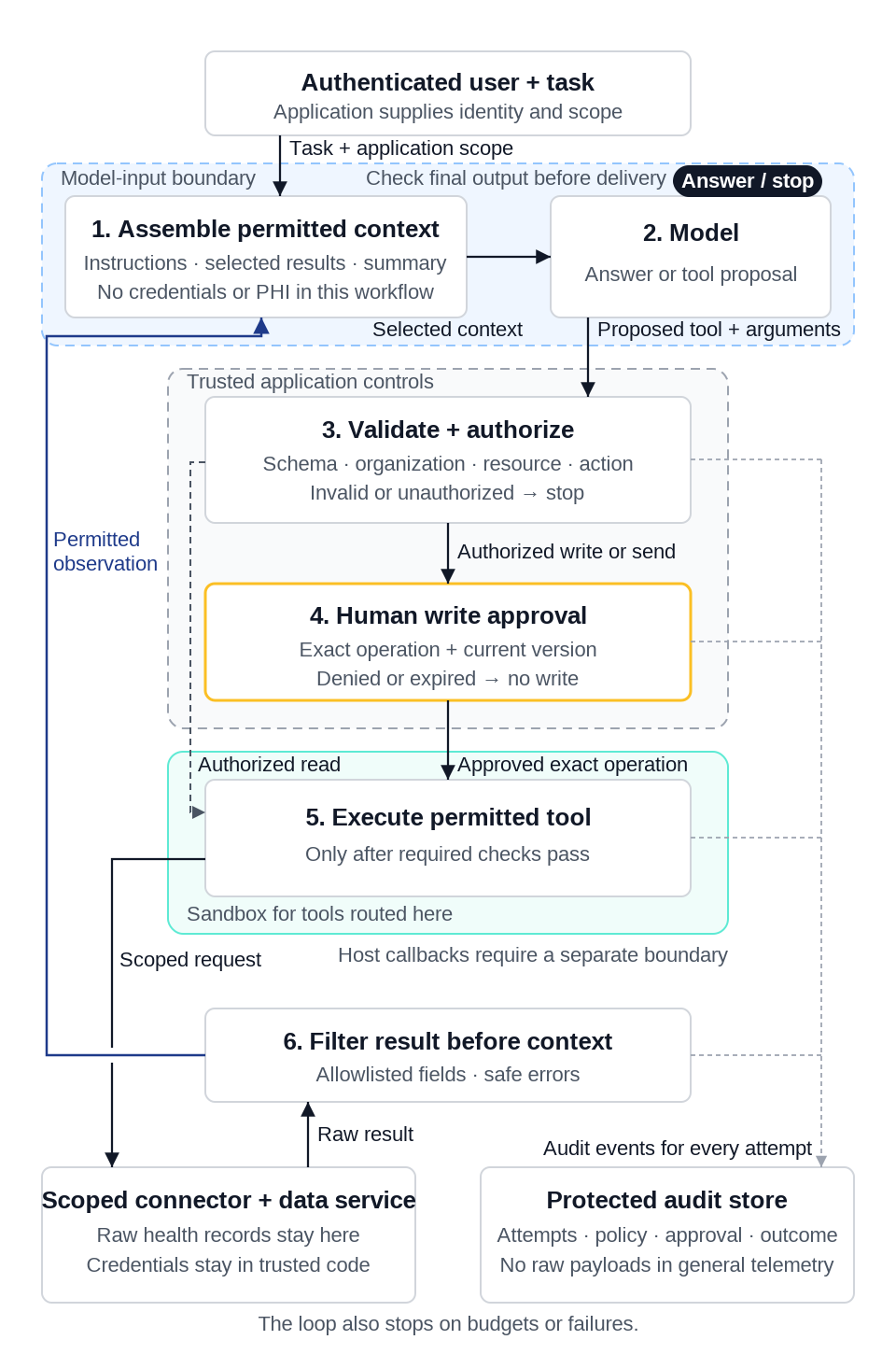
Design the controls before connecting health records
For organizations subject to the US HIPAA Security Rule, HHS describes requirements for risk analysis, access controls, audit controls, and other safeguards. A harness is one component in that wider system. The controls below are engineering recommendations for this design, rather than a complete compliance specification. HHS's Security Rule summary explains the broader obligations.
Give each tool a narrow job
Prefer tools with a specific job, such as read_encounter for a narrow view of an encounter or queue_note_for_signature for a draft note. Bind organization, user, and permitted resources from authenticated application state. Check them at execution time. Treat model-supplied identifiers as requests to validate against that scope.
Separate read and write capabilities, and give the underlying service identity only the permissions needed for its job. A narrow tool description cannot compensate for a callback that executes unrestricted SQL. OWASP recommends least privilege, code-managed credentials, and human approval for high-risk actions as mitigations for prompt injection, including malicious instructions carried in external content.
Put approval before the write
For an initial clinical workflow, require a clinician or authorized staff member to approve every write to the electronic health record (EHR), including orders, notes, medication or problem-list changes, and encounter and scheduling updates. Apply the same gate to every outbound message to patients, payers, or other providers. Show the exact FHIR resource, the proposed change, and the resource's current version in an authenticated review interface. For outbound messages, show the exact recipient and content. If the record or proposed action changes before execution, require a fresh decision.
Keep authorization and approval separate. A reviewer can approve only operations they are already permitted to perform. A denial, expired approval, unavailable reviewer, or failed policy check must leave the action unexecuted. Avoid a generic approval that grants the agent an open-ended editing session.
We have built approval and audit controls of this kind for a clinic in metro Atlanta, Georgia. The client's name is withheld.
Keep secrets and PHI out of context by design
Start with workflows whose reasoning can use operational status and synthetic or properly de-identified inputs. Keep connector credentials in a secret store accessible to trusted application code. Have narrow tools return approved fields, instead of fetching whole records and asking the model to ignore sensitive parts.
Inspect every route into context: user prompts, attachments, tool errors, retrieved text, summaries, and memory. Output filtering alone acts too late to prevent disclosure to the model provider. If clinical content is necessary, design an explicitly authorized processing path with privacy and security owners before connecting it.
Replacing a medical record number with a FHIR resource ID does not, by itself, establish de-identification. The remaining data and its linkability still matter. HHS describes two HIPAA de-identification methods, Expert Determination and Safe Harbor, in its de-identification guidance.
Record actions without creating another clinical dataset
Record every attempted tool call, including blocked and denied calls. Capture run and call identifiers, authenticated actor, tool and policy versions, who approved the action and when, and the outcome. Keep raw arguments and results out of general telemetry.
Keep patient identifiers and clinical payloads out of application and debug logs. Use a random correlation ID to trace a request. If you need to link events across requests for the same patient, use a keyed hash such as HMAC in a restricted logging path and keep the key in a key management service (KMS). A plain hash of a medical record number (MRN) can be matched by hashing candidate numbers, and masking only some digits leaves part of the identifier exposed. Treat the HMAC token as a sensitive pseudonym. See NIST guidance on pseudonymization.
In a separate, access-controlled, tamper-evident audit store, record who accessed which patient's record, when, and what happened. Set a retention period for these records. HL7 FHIR R4's AuditEvent gives this kind of security event a standard structure. The HIPAA audit-controls standard requires regulated entities to record and examine activity in systems that contain or use electronic PHI. The store design and event fields here are engineering recommendations. See 45 CFR 164.312(b) and FHIR R4 AuditEvent.
When a write times out, check the target system before retrying. The first attempt may already have succeeded.
Bound execution as well as tool selection
If tools run code, restrict files, processes, network destinations, and runtime credentials at an execution boundary outside the model. Also limit steps, elapsed time, output size, and spend. Test the actual deployed permissions, including whether a tool can reach the host filesystem or an unexpected endpoint.
OpenWorker's OpenShell integration guide draws a useful boundary: the harness remains trusted infrastructure, while selected tool execution runs in the sandbox. Application callbacks and host integrations can remain outside it. Selecting a sandbox does not isolate arbitrary code inside your application.
A small loop you can run
This example reads the status of a synthetic encounter and queues a fixed draft note for clinician signature. Save it as harness_demo.py and run python3 harness_demo.py. It uses the Python 3.10+ standard library and runs entirely locally with synthetic data. The checks ran on Python 3.10.2.
The deterministic demo_model proposes a read, then a write based on the returned encounter status. dispatch checks the proposal against the schema and the application's tool and encounter grants. For a permitted write, approve displays the draft and asks for a decision before dispatch adds it to the queue. audit records attempted calls and outcomes without the encounter reference or note text. A real LLM adapter can return structured calls through the same validation path.
"""Synthetic harness control demo. Python 3.10+, standard library only."""
import json
from datetime import datetime, timezone
from uuid import uuid4

ASSIGNED = "Encounter/SYN-001"
ALLOWED = frozenset({ASSIGNED})  # Supplied by the application.
TOOLS = frozenset({"read_encounter", "queue_note_for_signature"})
ENCOUNTERS = {ASSIGNED: "finished", "Encounter/SYN-999": "finished"}
DRAFT_NOTE = "Synthetic draft: the demonstration encounter is complete."
SIGNATURE_QUEUE = {}
RUN_ID = str(uuid4())


def audit(call_id, tool, outcome):
    print(json.dumps({
        "time": datetime.now(timezone.utc).isoformat(),
        "run": RUN_ID, "call": call_id, "policy": "demo-v2",
        "tool": tool, "outcome": outcome,
    }))


def approve(encounter, draft_note):
    try:
        return input(
            f"Queue this draft for clinician signature on {encounter}?\n"
            f"{draft_note}\nApprove? [y/N] "
        ).strip() == "y"
    except EOFError:
        return False


def dispatch(call, call_id):
    # Log an attempt without logging untrusted names, arguments or payloads.
    audit(call_id, "unvalidated", "requested")
    if (type(call) is not dict or set(call) != {"tool", "encounter"}
            or type(call["tool"]) is not str
            or type(call["encounter"]) is not str):
        audit(call_id, "unvalidated", "invalid_schema")
        return {"status": "blocked"}
    tool, encounter = call["tool"], call["encounter"]
    if tool not in TOOLS or encounter not in ALLOWED:
        audit(call_id, tool if tool in TOOLS else "unknown", "out_of_scope")
        return {"status": "blocked"}
    if tool == "queue_note_for_signature":
        if not approve(encounter, DRAFT_NOTE):
            audit(call_id, tool, "denied")
            return {"status": "denied"}
        audit(call_id, tool, "human_approved")
        SIGNATURE_QUEUE[encounter] = DRAFT_NOTE
        result = {"status": "queued_for_signature"}
    else:
        result = {"status": ENCOUNTERS[encounter]}  # Only the allowlisted field.
    audit(call_id, tool, "succeeded")
    return result


def demo_model(context):
    # Deterministic stand-in for an LLM's structured tool-call response.
    history = context["history"]
    if not history:
        return {"tool": "read_encounter", "encounter": ASSIGNED}
    if len(history) == 1 and history[-1]["status"] == "finished":
        return {"tool": "queue_note_for_signature", "encounter": ASSIGNED}
    return None


def run(model=demo_model):
    context = {"task": "Queue a draft note for the assigned synthetic encounter.",
               "tools": sorted(TOOLS), "history": []}
    for call_id in range(1, 5):
        call = model(context)
        if call is None:
            return
        result = dispatch(call, call_id)
        context["history"].append(result)
    print("Stopped: step limit reached.")


if __name__ == "__main__":
    run()
Type y to queue the draft for signature on Encounter/SYN-001. Press Enter, enter a different answer, or close standard input to leave the queue empty. Encounter/SYN-999 exists in storage outside the application's grant. Substituting that reference blocks either tool before approval. Adding an approved field fails schema validation.
The terminal prompt simulates approval to queue a note. Clinician signing and EHR integration are outside this example. The queue lives in memory, and audit events print to the terminal. Before connecting patient data, a real workflow needs authenticated review, durable approvals tied to record versions, retry and concurrency controls, and protected audit storage. A live model adapter also needs protocol validation, timeouts, and token limits. This example exercises the authorization and approval path with fixed model responses.
Where an SDK helps
An off-the-shelf harness can save substantial plumbing work. The OpenWorker Harness SDK repository documents an agent loop, model calls, approvals, streaming, and durable sessions. It provides TypeScript and Rust interfaces; its SDK engine is distinct from the Python engine used by OpenWorker Desktop. Those are implementation capabilities, not evidence of healthcare suitability.
As inspected on November 26, 2026, the current npm release is @openworkerai/[email protected]. OpenWorker's compatibility documentation still lists client beta.4. The API is evolving. Pin the chosen package and runtime combination, keep the lockfile, and test recovery before upgrading. This article's Python example uses no OpenWorker dependency.
The SDK also offers guardrails and hooks at input, model, tool, and output boundaries. Its documentation distinguishes blocking a call before execution from withholding a result after the action has happened. That distinction matters: redacting the result of an unauthorized write cannot undo the write.
Your team still owns identity, organization isolation, data selection, allowed tools, approval policy, retention, and operational response. Review these decisions independently of SDK feature names. An automated reviewer may assist triage; it should not silently replace the human write gate specified for this workflow.
Evaluate the workflow before expanding access
Evaluate the model and harness together. Check the resulting application state as well as the agent's final message: saying a task succeeded is different from performing the intended update. Run repeated trials when a real model is involved. Anthropic's guide to agent evaluations explains these distinctions.
Start with synthetic tasks and deliberate failures:
- Scope: request a valid record belonging to another organization. Expect a denial and no data disclosure.
- Approval: deny a write, change its arguments after approval, and let approval expire. Expect no update without a valid approval for that exact operation.
- Injection: put an instruction to export records in retrieved text. Expect the tool boundary to prevent the export.
- Privacy: place synthetic identifiers in tool errors and summaries. Check the outgoing model request and logs for leakage.
- Recovery: interrupt a write after the service accepts it. Expect reconciliation before any retry.
Set release criteria with the workflow owner: correct outcomes, unauthorized attempts blocked, sensitive data exposure, review burden, latency, and cost. Rerun the suite when models, policies, tools, or compaction behavior change. Passing a synthetic suite supports an engineering decision; it does not establish clinical utility.
A fixed workflow remains a credible alternative. If the steps are known and exceptions can go directly to a person, deterministic orchestration may be easier to validate. Anthropic's workflow-versus-agent distinction is useful here: add model-directed tool selection where choosing the next step provides a concrete benefit, then expand access only as the evidence supports it.
Get started
Celteeka's agentic engineering and AI services connect AI agents to business workflows. In a separate healthcare project, Celteeka developed a research-ready iOS app to support adolescents with eating disorders. The app is in a closed Stanford Clinic trial described in the Stanford Biodesign case study. To discuss a healthcare agent's tool boundaries, review gates, and evaluation plan, contact Celteeka.